Publié le 23/07/2017 à 11:06 par obdtool
Tags : image you
Xtuner T1 HD Heavy Duty Truck Diagnostic Tool Support Special Functions
XTUNER T1 Heavy Duty Trucks Auto Intelligent Diagnostic Tool is new professional Diesel scan tool released by TDINLTEL Tech. Xtuner T1 is with professional design, the hardware features in stability and anti-interference. The built-in over-voltage protection module is able to protect scanner and vehicle against accidental damage during checking.Support both USB and WIFI connection for the VCI,provide you great convenient in diagnosing Heavy duty trucks. Free update online.
XTUNER-T1 UI Upgraded!!!
1. Improve the communication layer.
2. Improve the print report.
3. Fix the bug of the setting function.
XTUNER-T1 Display:
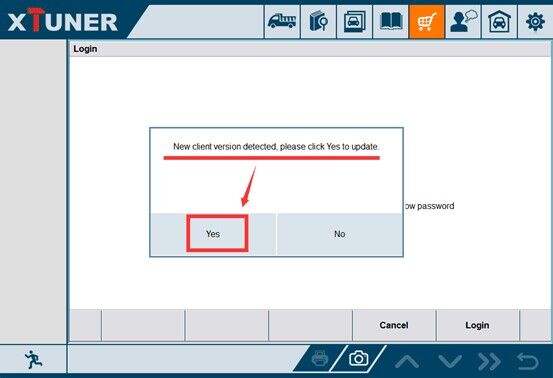
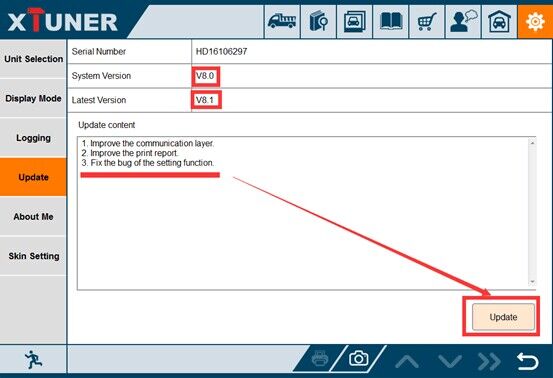
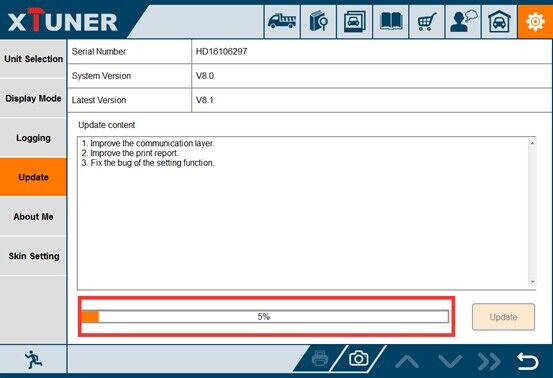
http://obd2scantool.us/2017/07/21/xtuner-t1-ui-upgraded/
Publié le 06/03/2017 à 10:21 par obdtool
Tags : MS908
The MaxiSys MS908P includes the MaxiFlash Elite reprogramming box and special Autel MaxiSys Pro MS908P software are needed for shops and technicians who demand a comprehensive diagnostic system capable of completing even the most complicated and demanding tasks.
Autel MaxiSys Pro MS908P Wifi Diagnostic System with two years Update Online
The MS908P feature:
1. Software Version: Every Car Model Software Has A Different Version.
2. Wi-Fi Technology: The VCI connects wirelessly to the main unit with Long-Range Class 1 Bluetooth
3. Update: Two Years Free Update Online, Other suppliers just offer one year free update on line, after one year, the update cost is USD1295 for next year, So we have saved USD1295 for you when you purchase MS908 PRO from us.
Autel MaxiSys Pro itself has already supported ECU programming function for BENZ and BMW cars, if you need to get support for more car models, you must use J2534 device along with OEM software to implement this function. J2534 DEVICE can not only use with AUTEL MAXISYS Pro , but also can work on other OEM software.
Some questions about MS908P:
Question: Can this be used to diagnose heavy duty machinery. like caterpillar machines and komatsu
Answer: newest tools software will diagnose heavy duty caterpillar machines and komatsu
Question: Can you reflash ecms such as chrysler, and will it reprogram ford pats systems
Answer: Yes it will do programming keys, but problem is you HAVE to have an (original) master key with it. and it should program ECM i have not used that feature yet.
Question: What are the cars that system works with?
Answer: this tool covers most all 1996 and newer Domestic, Asian, and European
Question: the article give me one year free to upgrade the software, from that date it begins?
Answer: Two years free updated once you register this product that day
Question: Can this scan transmission coes (U-codes) as well?
Answer: Yes, it will scan all systems on car including transmission.

Consult 3 Plus for Nissan is the newest Nissan scan tool.
The software version is V61.10, it can support both diagnostic and key programming for Nissan cars untill to 2016 year.
Nissan Consult 3 Plus Feature:
1.Software Version: V61.10, CSP
Software Version: CSP V20.11,
Key Programming Data Version: Pplus_V51.1F
2. Support both diagnostic and key programming, but you want to make key programming, still need to buy Security Card for Nissan Consult 3 Plus
3. Multi-Languages: English, Portuguese (Newly Add), French, German, Spanish, Italian, Japanese, Russian, Finnish, Greek, Chinese(Simplified), Chinese(Traditional)
4. Communication Mode: USB 2.0 / Bluetooth
5. Support systerm: Windows XP, WIN7, WIN8 & WIN10
Consult -3 Plus Function:
Consult-3 Plus for Nissan can support all the models of the Nissan and Infiniti from 1996 up till now, includes all Consult II & III functions .
And Consult III Plus can calcaulate the new 20 digital password for the Nissan new cars.
1. Consult-3 Plus for Nissan (Nissan Consult 3+) work for all nissan car , infiniti car and nissan gtr car to 2016.
2. Consult 3 Plus for Nissan work with obd-16 connector for the new kind of car, work with 14 pin connector for the old kind of car.
3. Consult-3 Plus for Nissan support nissan car electrolic system diagnostic function.
4. Consult 3 Plus for Nissansupport nissan electromobiles such as Leaf.
Support Car List:
1. Scantool Diagnostics:for all Nissan,Infiniti,GTR
2. Immobi and Smart key:for all Nissan,Infiniti,GTR
3. Nissan GTR: for Nissan GTR Diagbostics and Immobi
4. Electromobiles car:for Nissan Electromobiles car Diagbostics and Immobi
FAQ:
Q1: What is the difference among Nissan consult 3, consult 4 and Nissan consult 3 plus? Can Nissan consult 4 remap ECU and change IGN time-limited parameter?
A1:1) Nissan consult 3 and consult 4 share the same software version and parts, the difference between them is the appearance and the quality;
2) Nissan consult3 plus is the newest-released Nissan diagnostic it supports the Nissan up to 2016 year. And only Nissan Consult 3 Plus can support programming.
Q2: What additional card needed when use Nissan Consult 3 Plus to make key?
A2: It need additional card, it needs for making key, this card is Nissan Consult-3 plus Security Card, otherwise the button "Immobilizer key" is gray color and is unavailable.
Consult 3 Plus for Nissan is the newest Nissan scan tool.
The software version is V61.10, it can support both diagnostic and key programming for Nissan cars untill to 2016 year.
Nissan Consult 3 Plus Feature:
Consult iii Plus Software
1.Software Version: V61.10, CSP
Software Version: CSP V20.11,
Key Programming Data Version: Pplus_V51.1F
2. Support both diagnostic and key programming, but you want to make key programming, still need to buy Security Card for Nissan Consult 3 Plus
3. Multi-Languages: English, Portuguese (Newly Add), French, German, Spanish, Italian, Japanese, Russian, Finnish, Greek, Chinese(Simplified), Chinese(Traditional)
4. Communication Mode: USB 2.0 / Bluetooth
5. Support systerm: Windows XP, WIN7, WIN8 & WIN10
Consult 3 Plus Function:
Consult 3 Plus for Nissan can support all the models of the Nissan and Infiniti from 1996 up till now, includes all Consult II & III functions .
And Consult III Plus can calcaulate the new 20 digital password for the Nissan new cars.
1. Consult-3 Plus for Nissan (Nissan Consult 3 Plus) work for all nissan car , infiniti car and nissan gtr car to 2016.
2. Consult-3 Plus for Nissan work with obd-16 connector for the new kind of car, work with 14 pin connector for the old kind of car.
3. Consult-3 Plus for Nissan support nissan car electrolic system diagnostic function.
4. Consult-3 Plus for Nissansupport nissan electromobiles such as Leaf.
Support Car List:
1. Scantool Diagnostics:for all Nissan,Infiniti,GTR
2. Immobi and Smart key:for all Nissan,Infiniti,GTR
3. Nissan GTR: for Nissan GTR Diagbostics and Immobi
4. Electromobiles car:for Nissan Electromobiles car Diagbostics and Immobi
FAQ:
Q1: What is the difference among Nissan consult 3, consult 4 and Nissan consult 3 plus? Can Nissan consult 4 remap ECU and change IGN time-limited parameter?
A1:1) Nissan consult 3 and consult 4 share the same software version and parts, the difference between them is the appearance and the quality;
2) Nissan consult3 plus is the newest-released Nissan diagnostic it supports the Nissan up to 2016 year. And only Nissan Consult 3 Plus can support programming.
Q2: What additional card needed when use Nissan Consult 3 Plus to make key?
A2: It need additional card, it needs for making key, this card is Nissan Consult-3 plus Security Card, otherwise the button "Immobilizer key" is gray color and is unavailable.
Publié le 22/02/2017 à 10:28 par obdtool
Tags : 2010 mode

gm mdi diagnostic tool Plus EVG7 Laptop in 2017 new version support multi-language
GM MDI Scanner is the new design product for GM cars, it can support most new model GM cars, compare GM tech2 professional diagnostic tool, GM MDI Scan tool with more advantager than GM TECH2:
1.Support WIFI(optional)
2.Support 2010-2016 year new cars
3.Can do cars from 1990-2016.08 Year
4.Multi-Languages available:English, French, German,Italian.etc. Total 30 languages to choose
5. GM MDI software has been installed well into the EVG7 Tablet PC,you could use it directly in the evg7 tablet.
GM MDI scan tool Multiple Diagnostic Interface (GM MDI)
All current and most legacy vehicle protocols: UART, KW2000, CLASS2, GM LAN, etc.
Needed for Global A architechture vehicles
Supports Service Programming System (SPS)
Supports PC-Based diagnostics with rollout of the Global Diagnositc System (GDS) application
Includes Flight Recorder Mode
New Diagnostic Application Software required for Global A Vehicles
Global Diagnostic System (GDS)
PC-based software diagnsotics
DTCs, Diagnostics, Data Display & Visualization, Device Controls, Special Tests, Flight Recorder management, etc.
GDS is software which runs on a specific PC. Updates received via TIS2Web.
Multiple display options. More space for diagnsotics. Session management for multiple us.
Some questions about gm mdi diagnostic tool
What protocols does the MDI GM support?
For immediate use — At present, vehicles have two buses on the 16 pin connector
(high speed and low speed GMLAN). The GM MDI communicates using all of the existing GM protocols, the same as the Tech 2:
- UART
- Class 2
- KWP2000
- GMLAN (CAN)
The Future of the GM Tech 2
The GM Tech 2 remains an essential tool through at least the 2010 model year. The GM MDI will not support past models when its diagnostic capabilities are introduced. And, the Tech2 will continue to be needed to diagnose all vehicles fromprevious model years. Remote programming with the Tech 2 will continue to be supported for use on all 2007 and previous vehicles.Additional information will be supplied in future.
HOW WILL THE GM MDI BE USED?
The GM MDI will be required to perform diagnostics on selected NAO vehicles for model year 2009. Diagnostic software is scheduled to be released for the GM MDI during the fourth quarter of 2008.
Some user cant install the software after they buy this GM MDI Scanner.Now autonumen solve this problem, they sale GM MDI Plus EVG7 Tablet PC, the softare has beed instlled in the EVG7 well, so the user can use GM MDI directly after they purchase.

GM MDI scanner is the new design product for GM cars, it can support most new model GM cars, compare GM tech2 professional diagnostic tool, GM MDI Scan tool with more advantager than GM TECH2:
1.Support WIFI(optional)
2.Support 2010-2016 year new cars
3.Can do cars from 1990-2016.08 Year
4.Multi-Languages available:English, French, German,Italian.etc. Total 30 languages to choose
5. GM MDI software has been installed well into the EVG7 Tablet PC,you could use it directly in the evg7 tablet.
GM MDI scan tool Multiple Diagnostic Interface (GM MDI)
All current and most legacy vehicle protocols: UART, KW2000, CLASS2, GM LAN, etc.
Needed for Global A architechture vehicles
Supports Service Programming System (SPS)
Supports PC-Based diagnostics with rollout of the Global Diagnositc System (GDS) application
Includes Flight Recorder Mode
New Diagnostic Application Software required for Global A Vehicles
Global Diagnostic System (GDS)
PC-based software diagnsotics
DTCs, Diagnostics, Data Display & Visualization, Device Controls, Special Tests, Flight Recorder management, etc.
GDS is software which runs on a specific PC. Updates received via TIS2Web.
Multiple display options. More space for diagnsotics. Session management for multiple us.
Some questions about gm mdi diagnostic tool
What protocols does the MDI GM support?
For immediate use — At present, vehicles have two buses on the 16 pin connector
(high speed and low speed GMLAN). The GM MDI communicates using all of the existing GM protocols, the same as the Tech 2:
- UART
- Class 2
- KWP2000
- GMLAN (CAN)
The Future of the GM Tech 2
The GM Tech 2 remains an essential tool through at least the 2010 model year. The GM MDI will not support past models when its diagnostic capabilities are introduced. And, the Tech2 will continue to be needed to diagnose all vehicles fromprevious model years. Remote programming with the Tech 2 will continue to be supported for use on all 2007 and previous vehicles.Additional information will be supplied in future.
HOW WILL THE GM MDI BE USED?
The GM MDI will be required to perform diagnostics on selected NAO vehicles for model year 2009. Diagnostic software is scheduled to be released for the GM MDI during the fourth quarter of 2008.
Some buyers cant install the the software of GM MDI after they bought this scanner, now autonumen solve this problem for you, they sale GM MDI Plus EVG7 Tablet PC.The software has been installed in the EVG7 well, so the buyer can use MDI GM directly after they purchase this scanner.
Publié le 03/11/2016 à 06:17 par obdtool
Tags : internet you
Cherished buddy, if you purchase Establish X431 Diagun, have you lost while using diagun software update? if sure, i highly recommend you don’t be troubled, at this point I am going to show the regular problem along with reply within the x431 diagun update Q. The reason why won’t our pc acquire the updates? The. The Internet browser often have the pop-up blocker empowered. Maybe you have observed the yellow metal icon seem on the leading of your respective browser screen titled ‘Information Bar’. That denotes the popup blocker will be lively. To be able to outrank the pop-up blocker configurations, you need to press along with offer the ‘Ctrl’ key on your own keyboard although pressing the hyperlink to the acquire. Keep the ‘Ctrl’ key compromised until eventually the truth is the ‘Save As’ dialog box seem to the acquire. You might need to get this done per acquire. A further feasible basis for not necessarily becoming capable to acquire the updates is usually an terminated subscription. Make contact with the nearby vendor intended for current subscription prices and/or to purchase Launch X431 V Update.
Q. Ways to get the current car-line diagnostic software?
The. Establish will be publishing all new choices on the website (http://www.cnautotool.com/). You need to log in with your username and password and download the software to your hard drive, then transfer them from hard drive to the CF card.

Q. The reason why doesn’t our device discover our current CF Greeting card Autel MS908 PRO?
The. You can find a couple of feasible causes with this: one. Many workouts are generally displaced and also harmed. Acquire the most recent ‘System Data’ along with ‘Display Program’ from the acquire web page during www.cnautotool.com, along with update once again. only two. CF Greeting card will be harmed. Make contact with the nearby vendor intended for substitution Professional Diagnostic Tools.
Publié le 22/08/2016 à 17:51 par obdtool
Tags : you
Step 1 Be connected SKP900 Key Programmer to your Nissan OBD? connector through Major Cable, commence the car using a rural along with hold out a couple of seconds intended for SKP900 to start out.
2 Select Nissan, Brand-new System along with choose Sure to remain.
Step three Select Key one along with choose Sure
Step several Select Immobilizer Procedure in accordance with the autos Immo along with choose Sure OBD2 Auto Scanner Tools.
Step a few Hold out just the summer moments until eventually SKP-900 communicates while using automobile.
Step 6 Select Function, Procedure Assortment after that Key Change along with choose Sure.
Step 6 Choose Sure.
Step 7 In accordance with the teaching on screen, you need to insert a brand new key along with convert IGN on. You may observe the IMMO indication mild may flash if posting an integral which often are unable to commence powerplant. Select Sure.

Step on the lookout for Close up IGN change along with select Sure.
Step eight Wait for procedure changing and start IGN change along with select Sure MB SD Compact C4.
Step 13 Hold out just the summer moments as well as the key will be hard-wired efficiently.
Publié le 02/05/2016 à 10:36 par obdtool
Tags : you
Very MB STAR C4 Techie Normal Doubts
Q: this method with very MB legend 2012. 11 using moveableHDD pronounces simply no connecting regarding the home pc and also comports
A new: this COM convey number must be established seeing that com port1
Q: very MB legend program pronounces “No gain access to agreement program code, you need to get this legend examination contact center”;
A new: On the grounds that anyone have not full of energy the application, or definitely not energetic lucrative, you need to deliver this home owner IDENTITY that can help full of energy.
Q: most of applications are set off, although each and every time When i wide open this computer software offer, this demands my family just as before feedback legend necessary.
A new: If your 2nd time frame people feedback this legend necessary, you must push “save”, and also established this “lic-key-2 Properties”; Study exclusively.
Q: very MB legend process pronounces “invalidate”; how to carry out?
A new: alternative a single: deliver individuals for a second time this HW-ID, Lan-id, most of us support people energetic;
alternative a couple: established this personal computer time frame like this with very MB legend variation, as an example: in the event very MB legend software can be 2012. 05, established this personal computer time frame for you to concerning 2012. 05. 01 and also 2012. 05. 31.

Q: I have a single very MB legend 2012. eleven using moveable difficult drive, as When i go DAS, this pronounces “super MB legend dongle definitely not located! You need to put this USB Dongle”;
A new: Simply examine this VM options, you need to tick ahead of USB necessary, you need to established like that: Extractible Devices-USBkey-Show throughout Reputation Club.
Publié le 17/03/2016 à 07:57 par obdtool
Tags : you
Hyundai and Kia analysis tool provides simply just improved in order to freshly GDS (World-wide Analysis Method) program V2. 18 and VCI firmware V2. 18. The newest V2. 18 gds vci helps Hyundai and Kia motor vehicle until 2015 year.
Program edition: GDS V2. 18
500G SATA file format HDD, no DISC edition program
Firmware edition: VCI V2. 18
Language: British
Os: Succeed XP/VMware
The newest V2. 18 program could be caused
GDS VCI having Activate Module (Fright Track record) and GDS VCI OEM analysis tool
Both GSD program and VCI firmware could be up to date in order to V2. 18.
Easy methods to install GDS VCI V2. 18 program to get Hyundai & Kia analysis upon VMware?
you) Open up your GDS couple of. 18 program, build laptop date in order to 2015-5-1
couple of) Opel GDS (World-wide Analysis Method) program within the computing
a few) Open up your program and pick out “Configuration” tab

some) Check your aged VCI Firmware edition and check out “VCI Firmware Update”
some) Your VCI Firmware may be up to date in order to V2. 18 edition Auto Scanners.
six) Test and Detect.


